



Infrastructure optimized for growth

35+
Networks Supported

25ms
Avg Processing Time

25,000+ rq/s
Enterprise-ready

100+ TB
of Big Data

 Sign in

Access to full transaction data on all transactions & addresses

Retrieve blockchain data, balances, and transactions

Detailed blockchain history and transaction data for any address.

Full smart contracts metadata, including token symbols & token names

Access to full transaction data on all transactions & addresses

Get live crypto prices, exchange rates, supply and token contracts across protocols via one REST API.

Real-time notifications for events on top blockchains. Response under 100ms.

AML address screening across 35+ networks

Sync and manage HD wallets, keys and addresses

Local signing for EVM, UTXO, Tron, XRP, Kaspa and Solana

Precise blockchain transaction fee estimates based on transaction priority

Broadcast and verify transactions with real-time monitoring

Prepare EVM transactions, including token transfers

Test EVM transactions, optimize gas fees and identify security flaws

Pay for HTTP APIs, or charge for your own, in USDC stablecoin over the open x402 protocol — non-custodial, on-chain settlement.

MCP servers, CLI and skills for AI agents

Dedicated nodes infrastructure for leading blockchains using JSON-RPC

Address validation, encoding & cryptographic tasks optimizations

Shared node infrastructure for top blockchains using JSON-RPC.

Mar 20, 2026 • 3 min

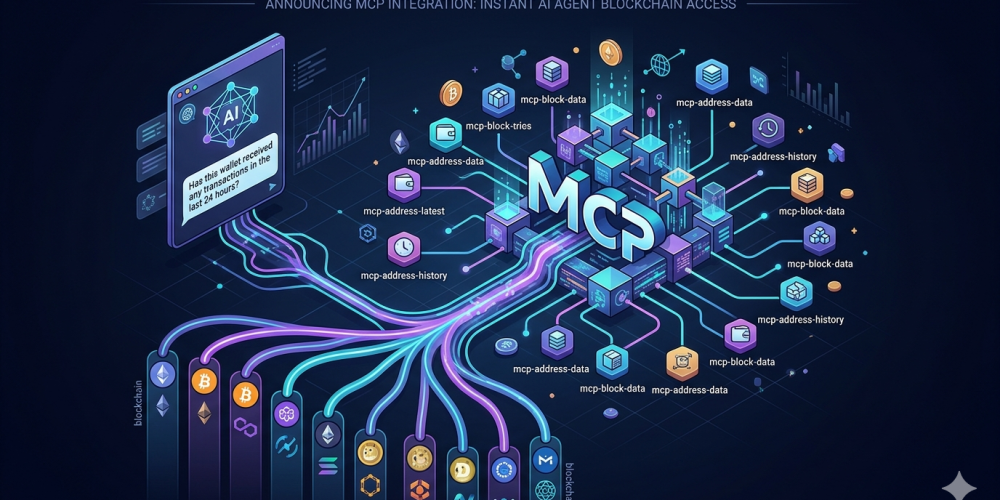
Imagine asking your AI assistant: "Has this wallet received any transactions in the last 24 hours?" — and getting an accurate, real-time answer in seconds, with zero integration code.
That works today. Here's how.
If you've tried to give an AI agent access to live on-chain data, you know the friction. You write a custom tool, wrap your API calls, handle chain-specific quirks, manage authentication, and by the time your agent can query a wallet balance, check a transaction, and estimate gas, you're maintaining a sprawling set of connectors.
Model Context Protocol (MCP) — the open standard now adopted by Anthropic, OpenAI, Google, and Microsoft — eliminates that. It's the layer that lets AI models discover and call external tools without custom integration work. CryptoAPIs now has 14 purpose-built MCP servers that plug directly into that standard.
Every server runs with a single npx command. No cloning, no building. Add this to your Claude Desktop, Cursor, or Windsurf config:
{
"mcpServers": {
"cryptoapis": {
"headers": {
"x-api-key": "YOUR_API_KEY"
},
"type": "http",
"url": "https://ai.cryptoapis.io/mcp"
}
}
}
Your agent can now answer questions like:
If you'd rather skip local setup entirely, connect directly to our remote endpoint:
{
"mcpServers": {
"cryptoapis": {
"type": "http",
"url": "https://ai.cryptoapis.io/mcp",
"headers": {
"x-api-key": "YOUR_API_KEY"
}
}
}
}
One endpoint. All 50 tools. All 14 server packages. Works with any MCP-compatible client.
Rather than listing them alphabetically, here's how they map to real workflows:
For most AI agent use cases — querying data, monitoring wallets, checking fees — the remote endpoint at ai.cryptoapis.io/mcp is the right choice. Fast to connect, no local process to manage.
For transaction signing, the local mcp-signer exists for a reason: your private keys should never travel over the network. In a production custody or trading context, you'd combine both — remote for all data queries, local signer for transaction execution. Your keys stay on your infrastructure. Your agent retains full capabilities.
If you only need a subset of tools, the remote server also supports product-scoped endpoints — for example, https://ai.cryptoapis.io/mcp/address-latest exposes only address balance tools, which means faster session initialization and a smaller context window for your AI client.
Complete install instructions, configuration examples for every MCP client, the full tool reference, and HTTP transport setup are in the official docs:
developers.cryptoapis.io/v-2.2024-12-12-175/RESTapis/ai-compatibility/mcp-servers
All 14 servers are open source, published on npm under @cryptoapis-io, and compatible with Claude, Cursor, Windsurf, n8n, and any MCP-compatible host.
Get your API key at cryptoapis.io and let us know what you're building.
Networks Supported
Avg Processing Time
Enterprise-ready
of Big Data




 Copy link